There is always a gap between "the project is real" and "the site is ready." A coming soon page fills it. It gives early visitors somewhere to land, and it collects the emails of everyone who cared enough to look you up before launch. I run TMPL, a small studio of Framer templates, and Foyer is the template I built for exactly this window: one page with a waitlist form, live in an afternoon.
Why put up a coming soon page at all
Think about what happens without one. You mention the project on social media, someone types in the domain, and they hit a parked page or nothing at all. That interest is gone, and you had no way to capture it.
A waitlist changes the math on launch day. Announcing to forty people who asked to hear from you works better than announcing to nobody. The list also tells you something before you've built anything: if weeks go by and nobody signs up, that's useful information too.
There's a smaller technical benefit. Your domain goes live earlier, so search engines can find it and start indexing before the real site exists.
What's inside Foyer
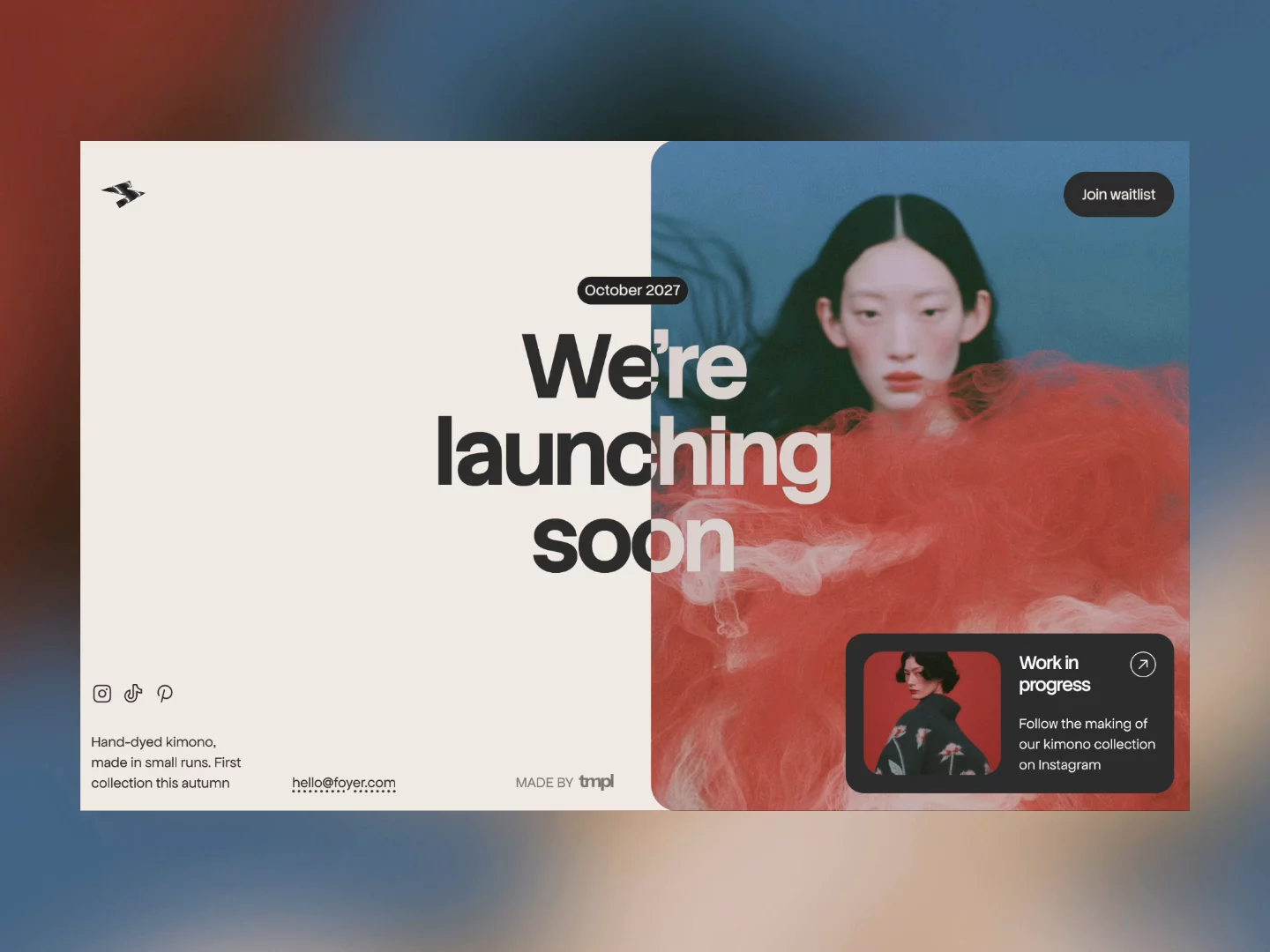
Foyer is a free coming soon and waitlist template. Two pages: Home and a 404 in the same visual language. The home page has a split-colour headline, a date badge for your launch month, an Instagram card, and a signup button that opens a modal with an email form.
The headline is the piece I spent the most time on. It's a code component called Adaptive Split Headline: the text changes colour at a point you choose, and everything is controlled from the property panel. Split position, both colours, size, weight, font, line height, letter spacing, alignment. You never touch the code. It also renders as a real H1, so search engines read your actual headline instead of a decorative image.
The signup form sits in the modal and is ready to connect to an email provider. There's no CMS, which for a page like this is a feature: there is simply nothing to maintain.
Setting it up
Duplicate the template into your Framer account with the remix link on the template page. Then it's an evening of visual editing: type your headline, set the launch month in the badge, point the Instagram card at your profile, and connect the form to your email tool. If you get stuck anywhere, I wrote a guide on how to edit a Framer template.
Publishing on a free framer.website subdomain costs nothing. For a launch page, though, I'd argue the custom domain is worth having from day one, because the pre-launch link gets shared more than you'd expect. Foyer runs on Framer's Basic plan, which starts at $10 a month on annual billing. Connecting the domain takes a few minutes, and I have a separate guide on custom domains if you haven't done it before. The full plan breakdown is in How Much Does Framer Cost.
Who it fits, and what to do after launch
Foyer was designed with fashion labels, studios, and startups in mind, but the honest requirement is simpler: you have a launch date, or at least a launch month, and you want a list of people to tell. If your audience lives on Instagram and you need a hub for several links rather than a single announcement, LinksPage is a free link in bio template that covers that case better.
After launch, the coming soon page has done its job. Replace it with the real site and keep the list. The emails live in your email tool, not in the template, so nothing is lost in the swap. The matching 404 page is worth carrying over, though. A styled 404 outlives most launch assets.
Foyer is free. If you want the paid templates too, All Access costs $199 as a lifetime deal (regular price $249). It covers all seventeen current TMPL templates plus everything I release in the future, with unlimited site usage.
FAQ
Is Foyer really free? Yes. You duplicate it into your Framer account with both pages included. Publishing on a custom domain needs a paid Framer plan. I explain what free actually covers in my free templates guide.
Can I collect emails with a free Framer template? Yes. Foyer's signup form lives in a modal and connects to your email provider. The form itself costs nothing; you only pay for whatever email tool you use, and most have free tiers.
Do I need to know how to code? No. Text, colours, and layout are edited visually. The split headline is a code component, but you control it entirely from the property panel.
Which Framer plan do I need? Foyer runs on the Basic plan, from $10 a month on annual billing. A free framer.website subdomain works too if you don't need a custom domain yet.
What happens to the page after launch? Replace it with your real site and keep the waitlist. Since the emails are stored in your email tool rather than in Framer, the swap loses nothing.